

Introduction
Coca-Cola Beverages Africa (CCBA) Group is the largest bottler in Africa and the 8th largest in the world, serving 15 countries with 42 bottling plants, several distribution sites and employing 17,000 people to serve 680,000 outlets. It accounts for 40% of the total Coca-Cola beverage volume consumed in Africa.
Over the last 3 years, CCBA’s Program Horizon enabled the transition from an on-prem SAP enterprise landscape to the Microsoft cloud Platform, leveraging Dynamics 365 at its core. The main objective of the program was to lay the digital foundation of the One CCBA transformation, enabling greater organizational and business agility. One of the most complex D365 F&O deployments globally, featuring 10+ ISVs, several integrations, nine markets, and one of the largest numbers of F&O and CE users on a digital transformation project. The documents present the transformation journey from Solutionade’s side, and how Solutionade team members were involved.
Solutionade Engagement and Contribution
In December 2020, Solutionade was approached by Microsoft-affiliated recruitment agencies to provide certified Dynamics 365 (D365) consultants for a Customer Engagement (CE) implementation. The objective was to support a comprehensive digital transformation initiative for Dynamics 365 Customer Engagement, starting from the project’s inception.
In addition to providing consultants, Solutionade contributed a Technical Architect responsible for integrating CE with external and internal applications, as well as a Lead for data migration between CE and Finance & Operations (F&O).
The project involved a multidisciplinary team comprising approximately 100 consultants and project managers. Solutionade played key roles in the following capacities:
- Senior Dynamics 365 CE Sales Consultants
- Two senior consultants collaborated closely with business consultants across Coca-Cola departments linked to commercial order management.
- Customer Services Consultant (D365 CE)
- Supported the Customer Care team by integrating issue tracking with orders, returns, and repairs.
- Field Services Consultant (D365 CE)
- Focused on tracking onsite work orders for equipment installation, repairs, and tagging.
- Integration Architect for CE
- Oversaw integration designs for seamless connectivity with other systems.
- Data Migration Lead for CE
- Managed data mapping processes to transition legacy systems into the new CE environment.
- Data Migration Lead for F&O
- Managed data mapping processes to transition legacy systems into the new F&O environment.
- Account Management Support
Provided dedicated account management during the later stages of the project.
Project Engagement (January 2021 – August 2024)
During the first 3-6 months of the project, Solutionade team members participated in workshops to gather requirements from business process leads. These efforts spanned across various functional streams, including:
- Sales Order Management stream
- Customer Services stream
- Field Services stream
- Events Management and Quoting
- D365 CE Integrations
- D365 CE Data Migrations
- D365 F&O Data Migrations
It is worth noting, from Solutionade’s perspective, that the initial project timeline was very strict, and the design documents were under pressure to be completed, which led to hasty and not-so-great decisions at the beginning of the project. In addition to this, the FO workshops began 3-4 weeks later than the CE workshops, leading to additional complications and misalignment of cross-functional processes between the CE and FO streams. During the period when
the D365 CE teams were ready to align, but the FO streams were significantly behind, necessitating considerable rework of the original FDDs to ensure alignment of requirements from both sides and accurate Dual Write mapping.
Figure 1 System Context
This diagram depicts the system context of the environment and all interacting users and systems. This is from the initial stages and was designed by Solutionade. The system context diagram captures all major.
CCBA Data Migration Project in Dynamics 365 F&O and CE (Case Study)
Data migration is a critical component of any enterprise resource planning (ERP) or customer relationship management (CRM) implementation. In the context of Dynamics 365, data migration involves transferring data from legacy systems (Dynamics on-prem, non-MS systems, etc.) to either Dynamics 365 Finance and Operations (F&O) and/or Dynamics 365 Customer Engagement (CE). This process is crucial for ensuring that businesses can continue their operations smoothly and effectively within the new system.
In this blog post, we will explore the steps involved in data migration to D365 F&O and D365 CE through a client case, providing insights into the work done.
Project intro
Four years ago, our company had the opportunity to work on Project Horizon, sending a team of experienced technical and functional consultants, first as a Microsoft contractor and then contracting for CCBA.
CCBA is the eighth largest Coca-Cola bottling partner worldwide by revenue and the biggest on the continent, accounting for about 40% of all Coca-Cola volumes sold in Africa. It employs more than 18,000 people and CCBA’s 40 bottling plants service over 720,000 customer outlets.
As of this year’s ranking (July 2024), Coca-Cola is in the 95th position on the Fortune 500 list and the strongest non-alcoholic drinks brand, holding the ranking’s only AAA+ brand strength rating and recording a Brand Strength Index (BSI) score increase of 0.8 points to 90.4 of 100 for this year (2024).
Project Horizon (5+ years project) for Coca-Cola Beverages Africa focused on the digital transformation journey for the African subsidiaries of the Coca-Cola Company to a new unified and more efficient solution.
Project Horizon enabled the system’s digital transformation journey to a one CCBA business solution that supports efficient, effective business processes and provides the correct information across the value chain at the right time to enable excellent customer service and accurate decision making, in the drive to CCBA’s full potential.
As part of Coca Cola Beverages Africa’s (CCBA) digital transformation journey, Project Horizon, CCBA has chosen to implement D365 F&O/ CE and best-of-breed third-party applications to replace existing legacy SAP and other 3rd Party corporate applications. CCBA has partnered with Microsoft to build and deploy a single CCBA template for all defined CCBA markets. The template offers the flexibility to adjust its functionality in line with the market’s position on the business maturity curve.
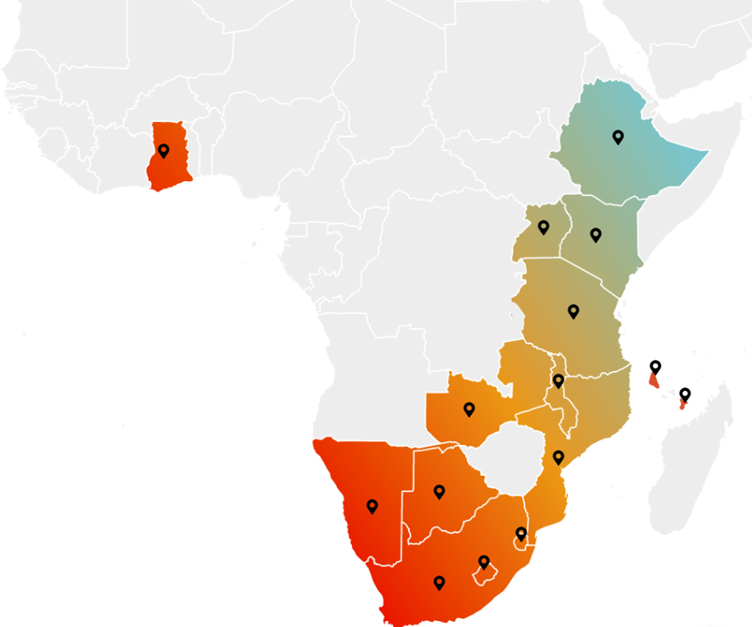
The project involved nine countries across the continent (South Africa, Namibia, Mozambique, Uganda, Tanzania, Kenya, Ethiopia, Botswana, and Zambia) with a total of 19 legal entities that needed to be migrated to Dynamics 365. Our project covered Data Migration with various legacy systems, such as SAP, Dynamics NAV, eoStar and older Dynamics solutions like AX. Since both D365 F&O and D365 CE were in scope of migration, 90% of the commercial master data needed to be migrated in D365 CE first and then synced through in D365 F&O. For that purpose, the Dual Write tool was used to sync across and validate first the config data, then master and transactional data. Each country had its own business processes and legacy systems in place that needed to be aligned and unified across CCBA into a single Dynamics 365 solution.
Understanding source and target systems
Before diving into the data migration process, it’s essential to understand the differences between Source and Target systems, as well as the distinctions between Dynamics 365 Finance and Operations (FO) and Customer Engagement (CE).
Source (legacy) systems
- SAP: Enterprise resource planning (ERP) software that helps businesses manage various operations, including finance, supply chain, HR, and customer relationships.
- EoStar: A route accounting and distribution management software, primarily used in the beverage industry. It offers solutions for warehouse management, route optimization, sales tracking, and inventory management.
- Dynamics NAV: Navision is an ERP solution designed for small to medium-sized businesses. It covers financial management, supply chain, manufacturing, and project management.
Target System
- Dynamics 365 Finance and Operations (FO): This suite is designed to manage financials, supply chain operations, manufacturing, and project management. It is a cloud ERP system that supports large-scale enterprise operations.
- Dynamics 365 Customer Engagement (CE): Formerly known as Dynamics CRM, CE is a cloud platform that focuses on customer relationship management, including sales, marketing, customer service, and field service as OOB functionalities, giving the user flexibility also to customize its own business solution.
Each of these platforms has specific data structures and requirements, making the data migration a complex yet manageable task when approached systematically.
Data Migration Flow
Data Migration Planning
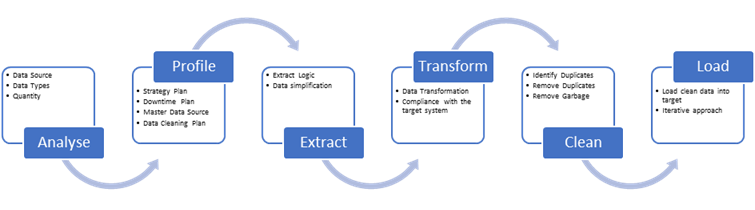
The first step in any data migration process is planning and profiling. Effective planning and profiling gave us a picture of the health of the legacy data that will help us to identify the weak spots as well as to set the migration rules, aiding in accurately moving the data.
- Assess Current Data: We begin by evaluating the current data. Identifying the data that needs to be migrated, such as customer records, financial transactions, inventory data, etc. Ensure the data is clean, free of duplicates, and accurate. For part of the analysis, business and key users were involved to ensure clear guidance on what needed to be communicated.
- Define the Scope: Clearly define what data will be migrated. Not all data from the legacy system may need to be moved to Dynamics 365. Deciding what’s critical and what can be archived. In our client case, the scope was to migrate:
- Configuration data: This data defines the settings and parameters that shape the system’s behavior and structure. It included items such as a chart of accounts, financial dimensions, workflows, and security roles. Configuration data is typically set up during the implementation phase and remains relatively stable over time. However, in our case, since different countries were involved, the configuration in some parts of the system was changed to fit local requirements.
- Master data: Referring to the core entities around which business operations revolve. It included information about customers and customer-related data, vendors, products, and employees. Master data was used consistently across different modules and processes, and maintaining its accuracy is crucial for effective system operation.
- Transactional data: Transactional data is the dynamic, day-to-day data generated from business activities and operations. This includes sales orders, purchase orders, invoices, payments, and inventory movements. Transactional data is highly volatile and continually updated as business transactions occur.
- Establish Data Mapping: Data mapping involved determining how data fields from the legacy systems will translate into the new Dynamics 365 environment. This is a critical step to ensure data integrity. With CCBA, this step was crucial because the mappings of fields between legacy systems and D365 F&O and/or D365 CE differ, yet they serve the same or nearly the same purpose and functionality.
- Set a Timeline: Establishing a timeline that includes milestones for each phase of the migration gives a clear picture of what and when it needs to be completed. Consider potential downtime, testing phases, and any critical business operations that might be affected. With CCBA, we encountered an overlap of Go-live activities on some legal entities. Concurrently, we initiated the first planning phases for other legal entities and countries that were in a later phase of the project, which necessitated detailed planning for the utilization of all resources.
Apart from the checkpoints for planning the migration process, business rules are crucial to be clear, outlined, and followed throughout the process. CCBA had many specific business rules that needed to be planned, translated, and applied in the new systems.
Data Extraction
Once planning was complete, the next logical step was data extraction. This involved pulling data from the legacy systems in preparation for migration.
- Selecting the Right Tools: Depending on the legacy system (SAP, eoStar, NAV, AX…), you may need specific tools for data extraction. In our client case, SQL Server Integration Services (SSIS) and third-party tools (KingswaySoft) were primarily used for data extraction. Still, every legacy system has its own specifics, like:
- Extracting from SAP
This was the most complex legacy system to migrate the data from, as there was no similarity with the D365 environments, meaning table relations were ridiculously complicated and entangled; you needed to join more than 20 tables to create a
customer master, fixed asset, or whatever else, a complete view of the record. BODS was used to pull the data into SQL server as it is (due to some corporate policies).
Following this, real magic began. Complex SQL queries were crafted to simplify the complexities (SAP to D365 relationship model) by transforming them into the staging MS SQL server, which was specifically designed to accommodate the D365 metadata and table relationships logic. From here on, we designed SSIS packages to extract, transform and load into D365 environments.
Thanks to the PiLog team, which helped resolve all the SAP legacy system complexities, we were able to fix all the data migration riddles and hiccups together.
- Extracting from eoStar
The EoStar environment was a challenge for us, as it was “first time seeing this”, but with good organization, we pulled ourselves together and managed to design a correct technical and functional approach. In the context of tooling, we utilized SQL queries and stored procedures to generate or emulate data, transforming it and then pushing it into MS SQL Server, where we had already established our setup with SSIS packages.
- Extracting from Dynamics NAV (on-prem)
This was a very well-known and charted territory for us, as its Dynamics system, and Dynamics world is where we are kicking buts. 😊
The tooling and ETL process were the same as the eoStar one, as it was a on-premises system with an accessible SQL server.
- Extracting from Dynamics 365 FO (different version and design)
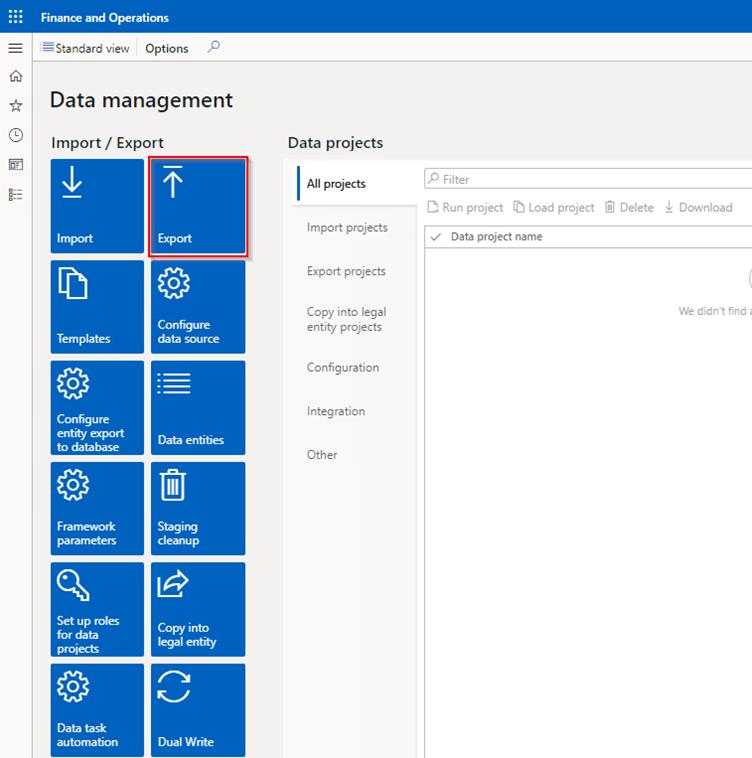
Using Data Migration Framework. The DMF tool in D365 F&O provides the flexibility to choose which entities to export and select specific tables and fields as needed. Most of the extracts were in MS Excel files.
- Create Backup: Before extracting data, we ensured to have a complete backup of the legacy systems. This provides a safety net in case anything goes wrong during extraction.
- Perform Data Cleansing: While extracting, it was vital to clean the data by removing duplicates, correcting errors, and ensuring consistency. This step was crucial to avoid carrying over issues from the legacy system to the new one. For CCBA, data cleansing presented a significant challenge, involving numerous workshops with the business to identify data that required cleaning, legacy records no longer in use, records incompatible with new requirements, dislocated data, inconsistent data, and partial data.
Data Transformation
Data transformation is the process of converting extracted data into a format that can be imported into Dynamics 365 FO or CE. This step was crucial. As we mentioned before, the data structures in Dynamics 365 may differ significantly from those in the source (legacy) system.
- Mapping Data Fields: Using the data mapping plan created during the planning phase to guide the transformation process, we ensured that every field in the legacy system was mapped to the correct field in Dynamics 365. As the data fields also differ from D365 F&O and D365 CE, they were addressed separately.
- Data Formatting: Depending on the source and destination systems, we needed to reformat data. For example, date formats, currencies, units of measure, etc., are required to be standardized. For CCBA, this involved local adaptation to different countries.
- Business Rules Application: We applied all the necessary business rules during this phase, which included data validation, enforcing data integrity, and ensuring compliance with business processes. Following current business rules was crucial for establishing a streamlined business process.
- Data Enrichment: It’s closely related to the business rules, as some rules might require additional data that was not present in the legacy system, but is
required according to the new design in D365. Additionally, our client decided that the business would provide enrichment data for certain modules, since the legacy system’s data was not properly maintained.
Data Loading
With the data transformed and ready, the next step was to load it into D365 CE and D365 F&O. This phase required careful execution to ensure that the data was correctly imported without any loss or corruption.
- Use Data Management Framework in D365 F&O: For D365 F&O, Microsoft provides the Data Management Framework (DMF), which supports bulk data import and export. We used DMF to import data entities in a controlled manner, requiring only this platform to move the data.
- Batch Processing in D365 F&O: If you’re migrating a large volume of data, consider using batch processing to import data in chunks. This approach helps manage system performance and reduces the risk of failures during the import process. For CCBA, since there were millions of records, they were handled in several batches to prevent system overload.
- Data Loading in D365 CE:
We used the Data Import Wizard for smaller datasets, typically for configuration/setup data. For larger migrations, master or transactional data, we used the SSIS packages in addition to KingswaySoft addon tools (SSIS Integration Toolkit) to load bulk data into D365 CE.
Sometimes, Data Import ++ is used from the XrmToolBox.
Data Validation and Testing
Data validation and testing are essential to ensure that the migrated data is correct and usable within Dynamics 365.
- Data Integrity Checks: Performing thorough checks to ensure that all data has been migrated correctly. Comparing records between the legacy system and Dynamics 365 to confirm accuracy.
- Functional Testing: Testing the system functionality to ensure that the migrated data supports business processes and business rules as expected. This included running financial reports, processing transactions, or generating customer reports. For our client, we provided primary support and worked closely with business users to execute testing.
- User Acceptance Testing (UAT): Engage end-users to validate the system from a functional perspective. UAT helps ensure that the system meets business needs and that users are comfortable with the new environment. CCBA for the UAT testing decided to run it with the key and business users, with our support in setting up the environment.
Post-Migration Activities
Once the data is migrated and validated, there are still some post-migration activities to complete.
- System Monitoring: Monitor the system closely during the initial days of post-migration. Monitor performance metrics, error logs, and user feedback closely to identify and address any issues early.
- Data Archival: Determining what to do with the legacy data that was not migrated. This might involve archiving it for compliance purposes or securely disposing of unnecessary data. In our case, the decision was to archive all the exports from the legacy systems, which included non-cleansed and unmigrated data.
- Documentation: Documenting the entire migration process, including any challenges faced and how they were resolved. This documentation can be invaluable for future migrations or audits. All exports, transformation rules, and load files were documented and archived.
User Training: Provide training to users on the new system, highlighting any differences from the legacy system. Well-trained users are essential for a smooth transition to the new system.
Cross-platform integration using Dual Write (DW)
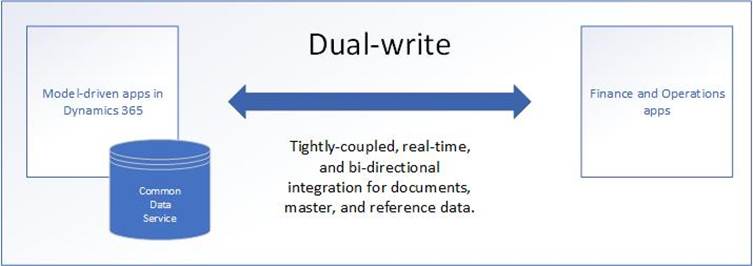
Cross-platform integration using Dual Write in Dynamics 365 refers to the seamless, real-time synchronization of data between Dynamics 365 Finance and Operations (FO) and Dynamics 365 Customer Engagement (CE) applications. In our Client Case, Dual Write provides a bidirectional or unidirectional connection that ensures consistency across these platforms, enabling data to be shared and updated simultaneously in both systems.
This integration allowed CCBA to unify its ERP and CRM systems, ensuring that data like customer information, orders, and financial transactions are automatically synced, reducing manual data entry and minimizing the risk of errors. Dual Write is essential for client organizations looking to maintain accurate, up-to-date data across their operational and customer-focused systems.
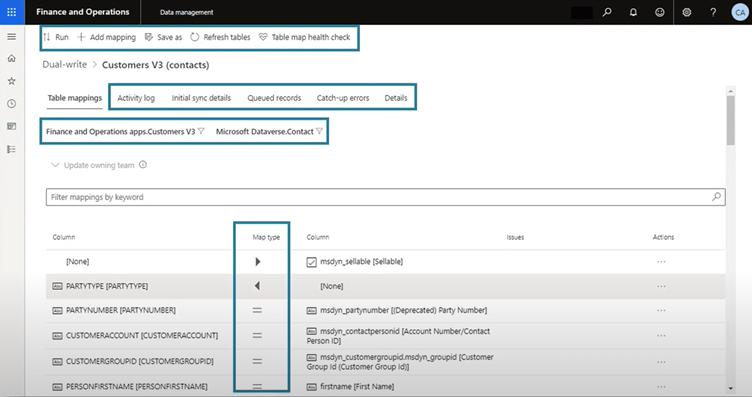
Configuration in both systems must be aligned and synced via DW to prevent errors during the migration process and maintain data consistency.
For our specific client case involving CCBA, the Dual Write maps were configured to align with business rules and processes. Some processes are triggered from CE, while others are from FO. This was defined in the planning phase, and the relation between the DW maps was set to assist in the loading of data. Some data was only loaded in CE, triggered the DW and synced to FO, while other data was triggered from FO to come
across to CE. These business rules and processes helped us plan and execute an effective Data Migration to D365.
Conclusion and lessons learned
Data migration to D365 F&O and D365 CE is a complex process that requires careful planning, execution, and validation. By following the steps outlined in this blog, businesses can ensure a successful migration, enabling them to leverage the powerful features of Dynamics 365 to drive their operations forward.
Whether you are migrating financial data to D365 F&O or customer records to D365 CE, the key to success lies in meticulous preparation, thorough testing, and ongoing support. With the right approach, your organization can make a seamless transition to Dynamics 365, setting the stage for improved efficiency and growth.
Among the lessons learned from this project, we can say that:
- Inadequate planning can derail the project. Breaking the project into manageable phases or waves helps ensure successful planning.
- Poor data quality at the source can lead to issues of post-migration. Utilizing data profiling tools to assess data quality early on and identify potential issues often alleviates post-migration problems.
- Lack of clear ownership leads to delays and conflicts. This is a critical issue; a data governance framework is necessary to outline the roles and responsibilities for managing the migrated data.
- Skipping or minimizing testing can lead to costly issues later. Validate data accuracy after each phase and ensure key business scenarios are tested comprehensively.
- A poorly defined cutover process can cause significant downtime and confusion. Run rehearsals of the cutover process in a non-production environment to identify any gaps and fine-tune the timeline.
- Scope creep can lead to extended timelines, additional costs, and frustration. Hold regular discussions with stakeholders to ensure expectations are well-managed, and everyone is aligned on the project’s scope.
- Lack of communication leads to misunderstandings and misaligned expectations. Develop a communication plan that keeps stakeholders informed of progress, challenges, and key decisions. Regularly update business leaders, IT teams, and end users on the status of the migration.
- Lack of expertise can slow down migration or lead to technical errors. Consider involving external consultants with a strong knowledge of the specific ERP or CRM system being implemented and of data migration practices.
- Business process changes can create confusion if not aligned with data migration. Work closely with the business process owners to avoid any disruption in day-to-day operations during and after the migration.
- Data migration doesn’t end at go-live. Set up a hyper-care period post go-live, where the project team remains engaged to ensure a smooth transition and address any post-go-live issues.
- Cultural differences play an important role during the entire project. This one is very crucial, especially when you work with clients located in another country
than yours, on another continent than yours, even in another hemisphere of the earth than yours, which was the exact case, skipping all the details (there’s a lot), let’s cut to the point.
To manage these cultural differences effectively, collaboration teams need to prioritize:
- Clear communication: Set expectations for how and when to communicate.
- Cultural awareness: Try to understand each other’s backgrounds and working styles.
- Flexibility: Be adaptable when it comes to time zones, holidays, and work-life balance.
Regular check-ins: Address any issues early and collaboratively, focusing on team cohesion.
Authors: Bojan Borisovski / Dragan Jovanoski / Chris Murgoski